MapReduce 入门 WorkCount 程序编写
程序打成jar包在服务器执行
- 引入相关的jar依赖 和配置
1
2
3
4
5
6
7
8
9
10
11
12
13
14
| <dependency>
<groupId>org.apache.logging.log4j</groupId>
<artifactId>log4j-slf4j-impl</artifactId>
<version>2.12.0</version>
</dependency>
<dependency>
<groupId>org.apache.hadoop</groupId>
<artifactId>hadoop-client</artifactId>
<version>3.1.3</version>
</dependency>
|
maven 打包插件
1
2
3
4
5
6
7
8
9
10
11
12
13
14
15
16
17
18
19
20
21
22
23
24
25
26
27
28
29
30
| <build>
<plugins>
<plugin>
<artifactId>maven-compiler-plugin</artifactId>
<version>3.6.1</version>
<configuration>
<source>1.8</source>
<target>1.8</target>
</configuration>
</plugin>
<plugin>
<artifactId>maven-assembly-plugin</artifactId>
<configuration>
<descriptorRefs>
<descriptorRef>jar-with-dependencies</descriptorRef>
</descriptorRefs>
</configuration>
<executions>
<execution>
<id>make-assembly</id>
<phase>package</phase>
<goals>
<goal>single</goal>
</goals>
</execution>
</executions>
</plugin>
</plugins>
</build>
|
log4j配置
1
2
3
4
5
6
7
8
9
| <?xml version="1.0" encoding="UTF-8"?>
<Configuration status="error" strict="true" name="XMLConfig">
<Appenders>
<Appender type="Console" name="STDOUT">
<Layout type="PatternLayout"
pattern="[%p] [%d{yyyy-MM-dd HH:mm:ss}][%c{10}]%m%n"/>
</Appender>
</Appenders>
</Configuration>
|
- 编写Mapper
编写自定义类继承 org.apache.hadoop.mapreduce.Mapper
1
2
3
4
5
6
7
8
9
10
11
12
13
14
15
16
17
|
public class WorkCountMapper extends Mapper<LongWritable, Text,Text,IntWritable> {

    private IntWritable intWritable = new IntWritable(1);

    @Override
    protected void map(LongWritable key, Text value, Context context) throws IOException, InterruptedException {
        //这里的key 是文件中数据的偏移量
        String[] words = value.toString().split(" ");
        for (String word : words) {
            Text text = new Text();
            text.set(word);
            context.write(text,intWritable);
        }
    }
}
|
- 编写 Reduce 继承 org.apache.hadoop.mapreduce.Reducer 类
1
2
3
4
5
6
7
8
9
10
11
12
13
14
15
16
17
18
| public class WorkCountMapReduce extends Reducer<Text, IntWritable,Text,IntWritable> {
private IntWritable count = new IntWritable();
@Override
protected void reduce(Text key, Iterable<IntWritable> values, Context context) throws IOException, InterruptedException {
//这里的key 是对应的词信息 values 是对应的key的集合
int sum = 0;
Iterator<IntWritable> iterator = values.iterator();
while (iterator.hasNext()){
sum += iterator.next().get();
}
count.set(sum);
context.write(key,count);
}
}
|
- 编写Driver 一个包含了main 方法的类。对应的参数需要通过main 方法传入。
1
2
3
4
5
6
7
8
9
10
11
12
13
14
15
16
17
18
19
20
21
22
23
24
25
26
27
28
29
30
31
32
33
34
35
36
37
38
|
public class WorkCountDriver {


    public static void main(String[] args) throws IOException, InterruptedException, ClassNotFoundException {
        //1. 因为是提交job信息,所以通过配置获取到job对象
        Configuration configuration = new Configuration();
        Job job = Job.getInstance(configuration);

        // 2.设置job的driver类
        job.setJarByClass(WorkCountDriver.class);

        // 3. 设置mapper 和 reduce 类信息
        job.setMapperClass(WorkCountMapper.class);
        job.setReducerClass(WorkCountMapReduce.class);

        // 4. 设置key value 信息
        job.setMapOutputKeyClass(Text.class);
        job.setMapOutputValueClass(IntWritable.class);

        job.setOutputKeyClass(Text.class);
        job.setOutputValueClass(IntWritable.class);

        // 5. 设置输入和输出路径 org.apache.hadoop.mapreduce.lib. 包下的
        FileInputFormat.setInputPaths(job,new Path(args[0]));
        FileOutputFormat.setOutputPath(job,new Path(args[1]));

        // 任务提交

        boolean ret = job.waitForCompletion(true);
        System.exit(ret ? 0 : 1);
    }


}
|
注意: Mapper 和 Reducer 都有2个 一个是接口一个是类。使用类的那个是3.x版本的
- 将程序打包成jar包
jar 包上传到服务器
执行程序命令
1
| hadoop jar mapReduceDemo-1.0-SNAPSHOT.jar com.w.mapreduce.WorkCountDriver /input /out
|
输出目录必须不存在
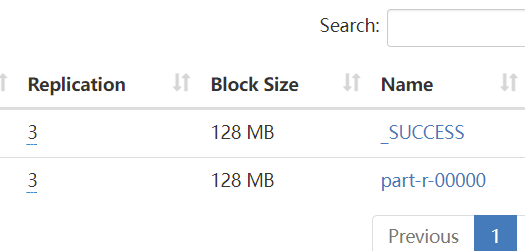
- 执行成功后,可以在 /out 目录下看到执行结果
windows 环境远程提交任务
如果想在开发环境远程提交MapReduce任务
首先需要本地配置hadoop的相关的环境变量等信息.
配置运行环境的用户
1
| -DHADOOP_USER_NAME=hadoop
|

- 因为本地运行无法指定输入和输出路径,所以配置输入和输出路径
hdfs://hadoop1:9820/input hdfs://hadoop1:9820/out2

- 将jar包放到服务器上运行的时候不需要指定配置信息,远程运行就需要设置了
1
2
3
4
5
6
7
8
9
10
11
12
13
14
15
| //hdfs 地址
configuration.set("fs.defaultFS", "hdfs://hadoop1:9820");
//运行在yarn
configuration.set("mapreduce.framework.name","yarn");
//设置跨平台远程运行
configuration.set("mapreduce.app-submission.cross-platform","true");
//ResourceManger 地址
configuration.set("yarn.resourcemanager.hostname","hadoop2");
Job job = Job.getInstance(configuration);
//设置jar的地址 当前程序打包到的地址
job.setJar("D:\\dev-projects\\mapReduceDemo\\target\\mapReduceDemo-1.0-SNAPSHOT.jar");
|
之前的job.setJarByClass 现在直接运行就直接指定jar