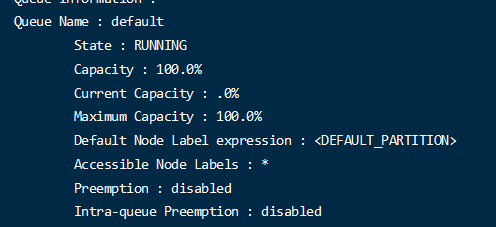
app|application prints application(s) report/kill application/manage long running application 显示应用列表和状态信息 杀死应用等 applicationattempt prints applicationattempt(s) report 打印尝试运行任务的报告 classpath prints the class path needed to get the hadoop jar and the required libraries 打印需要的类库和环境变量等信息 cluster prints cluster information 打印集群报告 container prints container(s) report 打印容器报告 envvars display computed Hadoop environment variables 显示hadoop环境变量 jar <jar> run a jar file 运行jar包文件 logs dump container logs 操作容器日志文件 queue prints queue information 打印队列信息 schedulerconf Updates scheduler configuration 更新调度器配置 timelinereader run the timeline reader server 运行timeline 读取服务 top view cluster information 查看集群实时监控信息 version print the version 版本号
yarn app –list 查看任务
yarn app -list -appStates All 根据状态筛选任务
yarn app -kill jobid 杀死任务
yarn applicationattempt -list [appId] 查看当前正在尝试运行的任务 ,从这里能获取到container ID 信息
Total number of application attempts :1 ApplicationAttempt-Id State AM-Container-Id Tracking-URL appattempt_1649993505147_0037_000001 FINISHED container_1649993505147_0037_01_000001 http://hadoop2:8088/proxy/application_1649993505147_0037/
<property> <description>The class to use as the resource scheduler.</description> <name>yarn.resourcemanager.scheduler.class</name> <value>org.apache.hadoop.yarn.server.resourcemanager.scheduler.capacity.CapacityScheduler</value> </property>
默认是 CapacityScheduler 可以更改为公平调度器。
客户端的最大请求线程数
1 2 3 4 5 6 7
<property> <description>Number of threads to handle scheduler interface.</description> <name>yarn.resourcemanager.scheduler.client.thread-count</name> <value>50</value> </property>
表示对应客户端请求的并发接收能力
Node Manager参数
自动根据硬件进行配置
1 2 3 4 5 6 7 8 9
<property> <description>Enable auto-detection of node capabilities such as memory and CPU. </description> <name>yarn.nodemanager.resource.detect-hardware-capabilities</name> <value>false</value> </property>
是否开启自动硬件配置设置,一般设置为false。不让它自动设置
虚拟核心数是否作为计算核心数
1 2 3 4 5 6 7 8 9 10 11
<property> <description>Flag to determine if logical processors(such as hyperthreads) should be counted as cores. Only applicable on Linux when yarn.nodemanager.resource.cpu-vcores is set to -1 and yarn.nodemanager.resource.detect-hardware-capabilities is true. </description> <name>yarn.nodemanager.resource.count-logical-processors-as-cores</name> <value>false</value> </property>
开启后虚拟核也作为一个cpu
虚拟化和真实核的乘数
这个值是 真实核 * 它 = 虚拟化的数量
比如 双核 4线程 那么应该配置2.
1 2 3 4 5 6 7 8 9 10 11 12 13 14
<property> <description>Multiplier to determine how to convert phyiscal cores to vcores. This value is used if yarn.nodemanager.resource.cpu-vcores is set to -1(which implies auto-calculate vcores) and yarn.nodemanager.resource.detect-hardware-capabilities is set to true. The number of vcores will be calculated as number of CPUs * multiplier. </description> <name>yarn.nodemanager.resource.pcores-vcores-multiplier</name> <value>1.0</value> </property>
NodeManger 的使用内存数
配置可以使用多少内存
1 2 3 4 5 6 7 8 9 10 11
<property> <description>Amount of physical memory, in MB, that can be allocated for containers. If set to -1 and yarn.nodemanager.resource.detect-hardware-capabilities is true, it is automatically calculated(in case of Windows and Linux). In other cases, the default is 8192MB. </description> <name>yarn.nodemanager.resource.memory-mb</name> <value>-1</value> </property>
使用的CPU核心数
可以用于向容器分配的cpu
1 2 3 4 5 6 7 8 9 10 11 12 13
<property> <description>Number of vcores that can be allocated for containers. This is used by the RM scheduler when allocating resources for containers. This is not used to limit the number of CPUs used by YARN containers. If it is set to -1 and yarn.nodemanager.resource.detect-hardware-capabilities is true, it is automatically determined from the hardware in case of Windows and Linux. In other cases, number of vcores is 8 by default.</description> <name>yarn.nodemanager.resource.cpu-vcores</name> <value>-1</value> </property>
开启物理内存检查限制容器
1 2 3 4 5 6 7 8
<property> <description>Whether physical memory limits will be enforced for containers.</description> <name>yarn.nodemanager.pmem-check-enabled</name> <value>true</value> </property>
开启虚拟的内存检查限制容器 建议关闭此选项
1
2
3
4
5
6
7
<property> <description>Whether virtual memory limits will be enforced for containers.</description> <name>yarn.nodemanager.vmem-check-enabled</name> <value>true</value> </property>
虚拟内存和物理内存的比例
虚拟内存 / 物理内存
1 2 3 4 5 6 7 8 9 10 11 12
<property> <description>Ratio between virtual memory to physical memory when setting memory limits for containers. Container allocations are expressed in terms of physical memory, and virtual memory usage is allowed to exceed this allocation by this ratio. </description> <name>yarn.nodemanager.vmem-pmem-ratio</name> <value>2.1</value> </property>
Container 参数
容器分配的最小内存
1 2 3 4 5 6 7 8 9 10
<property> <description>The minimum allocation for every container request at the RM in MBs. Memory requests lower than this will be set to the value of this property. Additionally, a node manager that is configured to have less memory than this value will be shut down by the resource manager.</description> <name>yarn.scheduler.minimum-allocation-mb</name> <value>1024</value> </property>
容器分配的最大内存
1 2 3 4 5 6 7 8
<property> <description>The maximum allocation for every container request at the RM in MBs. Memory requests higher than this will throw an InvalidResourceRequestException.</description> <name>yarn.scheduler.maximum-allocation-mb</name> <value>8192</value> </property>
容器分配的最小cpu
1
2
3
4
5
6
7
8
9
10
<property> <description>The minimum allocation for every container request at the RM in terms of virtual CPU cores. Requests lower than this will be set to the value of this property. Additionally, a node manager that is configured to have fewer virtual cores than this value will be shut down by the resource manager.</description> <name>yarn.scheduler.minimum-allocation-vcores</name> <value>1</value> </property>
容器分配的最大cpu
1
2
3
4
5
6
7
8
<property> <description>The maximum allocation for every container request at the RM in terms of virtual CPU cores. Requests higher than this will throw an InvalidResourceRequestException.</description> <name>yarn.scheduler.maximum-allocation-vcores</name> <value>4</value> </property>
<property> <name>yarn.scheduler.capacity.root.queues</name> <value>default,hive</value> <description> The queues at the this level (root is the root queue). </description> </property>
<property> <name>yarn.scheduler.capacity.root.default.maximum-capacity</name> <value>60</value> <description> The maximum capacity of the default queue. </description> </property>
<property> <name>yarn.scheduler.capacity.root.hive.maximum-capacity</name> <value>80</value> <description> The maximum capacity of the hive queue. </description> </property>
配置hive的最大容量
1
2
3
4
5
6
7
8
<property> <name>yarn.scheduler.capacity.root.hive.user-limit-factor</name> <value>1</value> <description> hive queue user limit a percentage from 0.0 to 1.0. </description> </property>
<property> <name>yarn.scheduler.capacity.root.hive.state</name> <value>RUNNING</value> <description> RUNNING or STOPPED. </description> </property>
表示是否开启这个队列,如果要临时关闭,可以把这个修改
1
2
3
4
5
6
7
8
<property> <name>yarn.scheduler.capacity.root.hive.acl_submit_applications</name> <value>*</value> <description> The ACL of who can submit jobs to the hive queue. </description> </property>
配置acl 访问此队列的权限
1 2 3 4 5 6 7 8 9
<property> <name>yarn.scheduler.capacity.root.hive.acl_administer_queue</name> <value>*</value> <description> The ACL of who can administer jobs on the hive queue. </description> </property>
配置管理此队列的权限
1
2
3
4
5
6
7
8
9
<property>
  <name>yarn.scheduler.capacity.root.hive.acl_application_max_priority</name>
  <value>*</value>
  <description>
    The ACL of who can submit applications with configured priority.
    For e.g, [user={name} group={name} max_priority={priority} default_priority={priority}]
  </description>
</property>
<property>
   <name>yarn.scheduler.capacity.root.hive.maximum-application-lifetime
   </name>
   <value>-1</value>
   <description>
      Maximum lifetime of an application which is submitted to a queue
      in seconds. Any value less than or equal to zero will be considered as
      disabled.
      This will be a hard time limit for all applications in this
      queue. If positive value is configured then any application submitted
      to this queue will be killed after exceeds the configured lifetime.
      User can also specify lifetime per application basis in
      application submission context. But user lifetime will be
      overridden if it exceeds queue maximum lifetime. It is point-in-time
      configuration.
      Note : Configuring too low value will result in killing application
      sooner. This feature is applicable only for leaf queue.
   </description>
 </property>
<property>
   <name>yarn.scheduler.capacity.root.hive.default-application-lifetime
   </name>
   <value>-1</value>
   <description>
      Default lifetime of an application which is submitted to a queue
      in seconds. Any value less than or equal to zero will be considered as
      disabled.
      If the user has not submitted application with lifetime value then this
      value will be taken. It is point-in-time configuration.
      Note : Default lifetime can't exceed maximum lifetime. This feature is
      applicable only for leaf queue.
   </description>
 </property>
配置队列中任务的默认的时间,如果提交的任务的时间小于此值将被忽略。
配置修改后,将配置发送到其他机器上。
刷新队列的配置
1
yarn rmadmin -refreshQueues
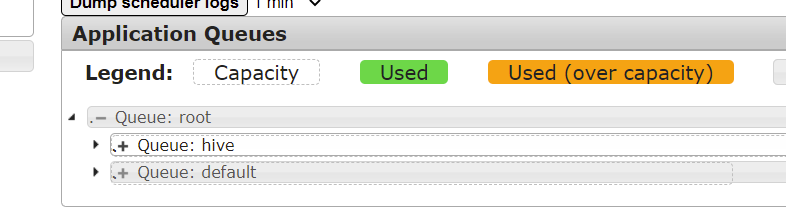
查看到已经有多个队列了
使用指定队列提交任务
命令行参数
1
hadoop jar hadoop-mapreduce-examples-3.1.3.jar wordcount -D mapreduce.job.queuename=hive /input /dd