hbase Shell 执行 bin/hbase 命令 可以看到有很多可以执行的子命令操作
1
2
3
4
5
6
7
8
9
10
11
12
13
14
15
16
17
18
19
20
21
22
23
24
25
26
27
28
29
30
31
32
33
34
35
36
37
38
39
./hbase Usage: hbase [<options>] <command > [<args>] Options: --config DIR Configuration direction to use. Default: ./conf --hosts HOSTS Override the list in 'regionservers' file --auth-as-server Authenticate to ZooKeeper using servers configuration --internal-classpath Skip attempting to use client facing jars (WARNING: unstable results between versions) --help or -h Print this help message Commands: Some commands take arguments. Pass no args or -h for usage. shell Run the HBase shell 打开sehll hbck Run the HBase 'fsck' tool. Defaults read-only hbck1. Pass '-j /path/to/HBCK2.jar' to run hbase-2.x HBCK2. snapshot Tool for managing snapshots 管理快照 wal Write-ahead-log analyzer wal 日志解析 hfile Store file analyzer hfile 文件解析 zkcli Run the ZooKeeper shell 内部的zk shell master Run an HBase HMaster node 启动 hmaster节点 regionserver Run an HBase HRegionServer node 启动region服务 zookeeper Run a ZooKeeper server 启动zk服务 rest Run an HBase REST server 启动reset 服务 thrift Run the HBase Thrift server 启动 Thrift 服务 thrift2 Run the HBase Thrift2 server 启动 Thrift2 服务 clean Run the HBase clean up script 启动清理脚本 classpath Dump hbase CLASSPATH 导出 classpath mapredcp Dump CLASSPATH entries required by mapreduce 通过mr 导出classpath pe Run PerformanceEvaluation ltt Run LoadTestTool canary Run the Canary tool version Print the version 打印版本 completebulkload Run BulkLoadHFiles tool regionsplitter Run RegionSplitter tool region切分,当数据再一个region上放不下的时候 rowcounter Run RowCounter tool cellcounter Run CellCounter tool pre-upgrade Run Pre-Upgrade validator tool hbtop Run HBTop tool CLASSNAME Run the class named CLASSNAME
这里通过shell 命令可以做一些数据的相关处理。
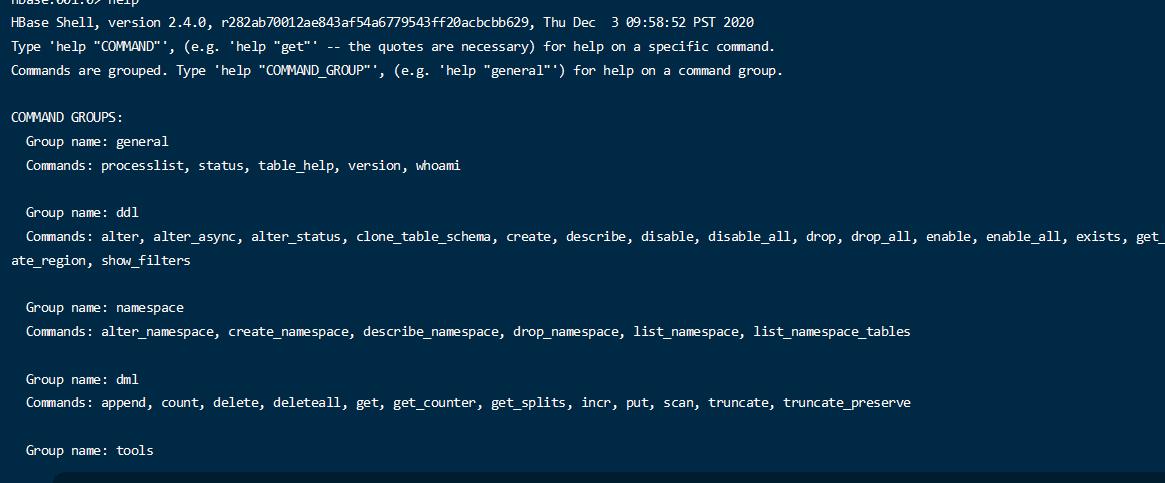
打开hbase shell 查看可用操作
基本上分为几种分区命令。
通用命令 processlist, status, table_help, version, whoami
ddl alter, alter_async, alter_status, clone_table_schema, create, describe, disable, disable_all, drop, drop_all, enable, enable_all, exists, get_table, is_disabled, is_enabled, list, list_regions, locate_region, show_filters
namespace alter_namespace, create_namespace, describe_namespace, drop_namespace, list_namespace, list_namespace_tables
dml append, count, delete, deleteall, get, get_counter, get_splits, incr, put, scan, truncate, truncate_preserve
tools assign, balance_switch, balancer, balancer_enabled, catalogjanitor_enabled, catalogjanitor_run, catalogjanitor_switch, cleaner_chore_enabled, cleaner_chore_run, cleaner_chore_switch, clear_block_cache, clear_compaction_queues, clear_deadservers, clear_slowlog_responses, close_region, compact, compact_rs, compaction_state, compaction_switch, decommission_regionservers, flush, get_balancer_decisions, get_largelog_responses, get_slowlog_responses, hbck_chore_run, is_in_maintenance_mode, list_deadservers, list_decommissioned_regionservers, major_compact, merge_region, move, normalize, normalizer_enabled, normalizer_switch, recommission_regionserver, regioninfo, rit, snapshot_cleanup_enabled, snapshot_cleanup_switch, split, splitormerge_enabled, splitormerge_switch, stop_master, stop_regionserver, trace, unassign, wal_roll, zk_dump
replication add_peer, append_peer_exclude_namespaces, append_peer_exclude_tableCFs, append_peer_namespaces, append_peer_tableCFs, disable_peer, disable_table_replication, enable_peer, enable_table_replication, get_peer_config, list_peer_configs, list_peers, list_replicated_tables, remove_peer, remove_peer_exclude_namespaces, remove_peer_exclude_tableCFs, remove_peer_namespaces, remove_peer_tableCFs, set_peer_bandwidth, set_peer_exclude_namespaces, set_peer_exclude_tableCFs, set_peer_namespaces, set_peer_replicate_all, set_peer_serial, set_peer_tableCFs, show_peer_tableCFs, update_peer_config
snapshots clone_snapshot, delete_all_snapshot, delete_snapshot, delete_table_snapshots, list_snapshots, list_table_snapshots, restore_snapshot, snapshot
configuration update_all_config, update_config
quotas disable_exceed_throttle_quota, disable_rpc_throttle, enable_exceed_throttle_quota, enable_rpc_throttle, list_quota_snapshots, list_quota_table_sizes, list_quotas, list_snapshot_sizes, set_quota
: security grant, list_security_capabilities, revoke, user_permission
procedures list_locks, list_procedures
visibility labels add_labels, clear_auths, get_auths, list_labels, set_auths, set_visibility
rsgroup add_rsgroup, alter_rsgroup_config, balance_rsgroup, get_rsgroup, get_server_rsgroup, get_table_rsgroup, list_rsgroups, move_namespaces_rsgroup, move_servers_namespaces_rsgroup, move_servers_rsgroup, move_servers_tables_rsgroup, move_tables_rsgroup, remove_rsgroup, remove_servers_rsgroup, rename_rsgroup, show_rsgroup_config
所有的命令的用法都可以使用help + ‘命令’’ 的方式查询详细的用法。
注意: 使用help 后面的命令需要加引号 比如 help ‘create_namespace’
namespace 操作 创建
1 create_namespace 'first_namespace'
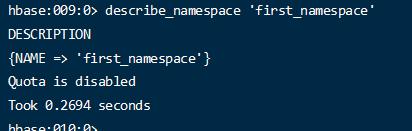
详情
1 describe_namespace 'first_namespace'
所有
删除
1 drop_namespace 'first_namespace'
表相关的操作 首先已经创建了 one 了
创建表 1 create 'one:user' ,{NAME => 'info' , VERSIONS => 1}, {NAME => 'group' , VERSIONS => 1}
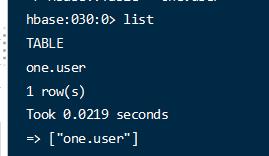
创建表的时候只需要定义列族信息和列族属性信息。 namesapce.tablename 表示完整的表名 逗号分割后支持多个并列的列族. verion 表示列族维护的数据的版本个数。如果1 表示只保留一个。 显示表
表详情
禁用 和启用 1 2 disable 'one:user' enable 'one:user'
修改表的属性信息 1 alter 'one:user' ,{NAME => 'info' ,VERSIONS => 3}
如果info 这个列族 不存在就新增一个列族,如果存在就修改此列族的信息。
删除列族
1 alter 'one:user' , 'delete' => 'group'
这样就把group 这个列族删除了。
再新建一个列族
1 2 alter 'one:user' ,{NAME => 'address' ,VERSIONS => 2}
删除表 ERROR: Table one.aa is enabled. Disable it first.
数据操作 插入数据 1 2 3 4 5 put 'one:user' ,'001' ,'info:name' ,'张三' put 'one:user' ,'001' ,'info:age' ,10 put 'one:user' ,'001' ,'address:provice' ,'beijing' put 'one:user' ,'001' ,'address:city' ,'beijing'
逗号分割分别是 完整表明 , row Key , 列族:列明 ,cell Value
根据row key 获取单个数据 1 2 3 4 5 6 7 COLUMN CELL address:city timestamp=2022-05-18T16:27:40.340, value=beijing address:provice timestamp=2022-05-18T16:27:21.196, value=beijing info:age timestamp=2022-05-18T16:22:19.616, value=10 info:name timestamp=2022-05-18T16:20:46.100, value=\xE5\xBC\xA0\xE4\xB8\x89 1 row(s) Took 0.0714 seconds
只获取指定列族或列的数据
1 2 get 'one:user' ,'001' ,{COLUMN => 'info.name' } get 'one:user' ,'001' ,{COLUMN => 'info:name' }
扫描数据 再插入一些数据
1 2 3 4 put 'one:user' ,'005' ,'info:name' ,'lisi' put 'one:user' ,'002' ,'info:name' ,'wangwu' put 'one:user' ,'003' ,'info:name' ,'zhangliu' put 'one:user' ,'004' ,'info:name' ,'xx'
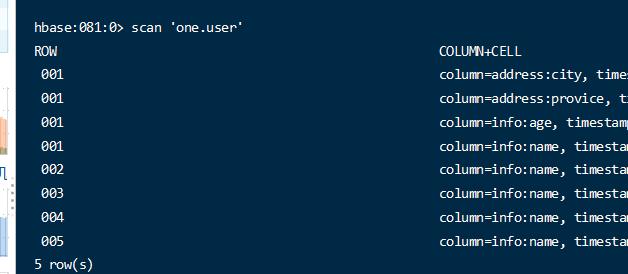
直接使用san命令
将把所有的数据扫描出来。
1 scan 'one:user' ,{FORMATTER_CLASS => 'org.apache.hadoop.hbase.util.Bytes' , FORMATTER => 'toString' }
增加格式化参数,可以让中文也显示出来。
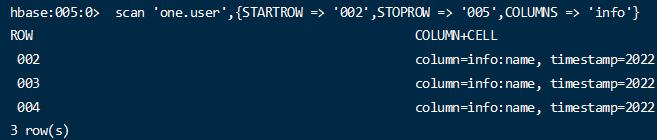
1 2 scan 'one:user' ,{STARTROW => '002' ,STOPROW => '005' ,COLUMNS => 'info' }
通过row key 过滤部分数据,同时只显示特定的列。
版本管理 在多次put的时候会为这个表格添加多个版本的数据。
1 2 3 put 'one:user' ,'000' ,'info:name' ,'v' put 'one:user' ,'000' ,'info:name' ,'b' put 'one:user' ,'000' ,'info:name' ,'a'
连续执行3次。
如果直接使用get 那么将只能看到最新版本的数据
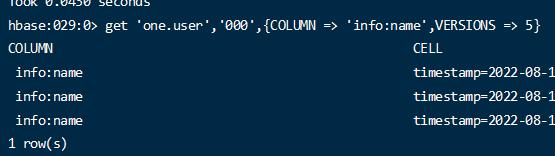
1 get 'one:user' ,'000' ,{COLUMN => 'info:name' ,VERSIONS => 3}
但是当加上VERSIONS 指定几个版本的,将看到指定版本的数据。(列族也配置了多版本的情况下)
删除数据 删除数据涉及2个api delete, deleteall,
delete 将删除数据的最新版本,deleteall 将删除数据的所有版本
1 2 delete 'one:user' ,'000' ,'info:name'
1 deleteall 'one:user' ,'000' ,'info:name'
再次查看将没有数据了
1 get 'one:user' ,'000' ,{COLUMN => 'info:name' ,VERSIONS => 5}
incr 为一个数据做自增操作 1 2 3 incr 'one:user' ,'011' ,'info:age' ,1 incr 'one:user' ,'011' ,'info:age' ,10
当第一个列不存在的时候,设置为 1,再一次递增为11.
注意:如果字符串类型等是无法执行此操作的。
物理结构 前面已经将hbase服务启动成功并正确配置了hdfs的地址,并且已知hbase的数据和配置都存在于hdfs中的。
那么访问hdfs 文件管理,可以查看对应的文件。
在hdfs /hbase 目录下创建了许多的文件
/hbase/data 目录下的文件放着所有的namespace 目录
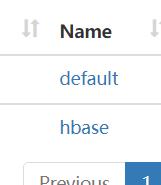
/hbase/data/default 目录下是空的,因为目前没有创建任何的数据。
/hbase/data/hbase 目录下有一些生成的文件,这些文件我们是不要操作的。是系统使用的文件。
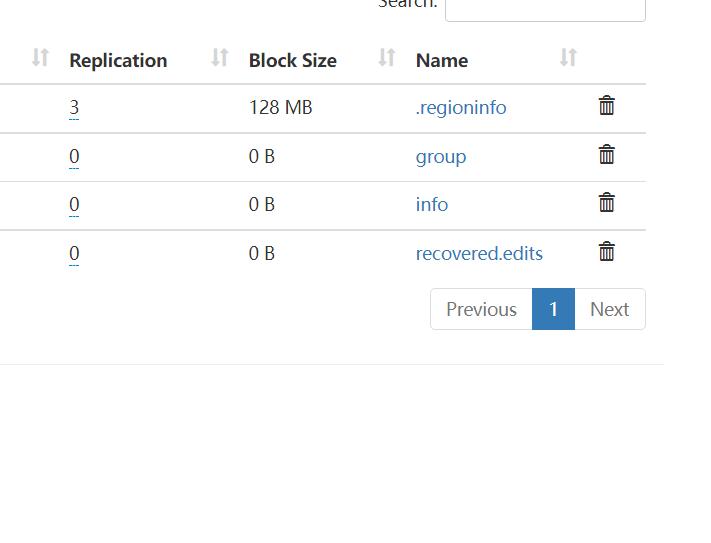
一个namespace 将是一个hdfs目录,对应的创建的table 将是namespace里的一个目录,table 里的 列族将也是一个一个的目录。
API操作 官方文档链接 https://hbase.apache.org/book.html#hbase_apis
classpath resoruce 下放置配置文件 hbase-site.xml 1 2 3 4 5 6 7 8 9 10 <?xml version="1.0"?> <?xml-stylesheet type="text/xsl" href="configuration.xsl"?> <configuration > <property > <name > hbase.zookeeper.quorum</name > <value > hadoop1:2181,hadoop2:2181,hadoop3:2181</value > <description > The directory shared by RegionServers. </description > </property > </configuration >
配置文件中放置连接信息
创建单例模式的连接工厂类,用于获取和关闭连接 1 2 3 4 5 6 7 8 9 10 11 12 13 14 15 16 17 18 19 20 21 22 23 24 25 26 27 28 29 30 31 32 33 34 35 36 37 38 39 import org.apache.hadoop.conf.Configuration;import org.apache.hadoop.hbase.client.Connection;import java.io.IOException;public class ConnectionFactory { private static Connection connection; private static final Object lockObj = new Object (); public static Connection getConnection () { if (connection == null ){ synchronized (lockObj){ if (connection == null ){ try { Configuration config = new Configuration (); config.addResource(ConnectionFactory.class.getClassLoader().getResource(" hbase-site.xml" )); connection = org.apache.hadoop.hbase.client.ConnectionFactory.createConnection(config); } catch (Exception e) { e.printStackTrace(); } } } } return connection; } public static void closeConnection () { try { connection.close(); } catch (IOException e) { e.printStackTrace(); } } }
操作基本分为2类操作。一个是管理的操作,一个是数据的操作。 核心用到 connection.getAdmin(); 和 connection.getTable(tableNameObj)
将这2个获取方法抽象出来。
1 2 3 4 5 6 7 8 9 10 11 12 13 14 15 16 17 18 19 20 21 22 23 24 25 26 import org.apache.hadoop.hbase.client.Admin;import org.apache.hadoop.hbase.client.Connection;import java.io.IOException;@FunctionalInterface public interface AdminOperation <T> { T adminOpt (Admin admin) throws IOException; default T operation () { Connection connection = ConnectionFactory.getConnection(); Admin admin; T result; try { admin = connection.getAdmin(); result = adminOpt(admin); } catch (IOException e) { throw new RuntimeException (e.getMessage()); } return result; } }
Admin 操作
1 2 3 4 5 6 7 8 9 10 11 12 13 14 15 16 17 18 19 20 21 22 23 24 25 26 27 import org.apache.hadoop.hbase.TableName;import org.apache.hadoop.hbase.client.Connection;import org.apache.hadoop.hbase.client.Table;import java.io.IOException;@FunctionalInterface public interface TableOperation <T> { T tableOpt (Table table) throws IOException; default T operation (String namespace, String tableName) { Connection connection = ConnectionFactory.getConnection(); Table table; T result; try { TableName tableNameObj = TableName.valueOf(namespace, tableName); table = connection.getTable(tableNameObj); result = tableOpt(table); } catch (IOException e) { throw new RuntimeException (e.getMessage()); } return result; } }
table 操作
使用的时候去创建这2个类的匿名类并实现抽象方法。
namesapce的相关操作 1 2 3 4 5 6 7 8 9 10 11 12 13 14 15 16 17 18 19 20 21 22 23 24 25 26 27 28 29 30 31 32 33 34 35 36 37 38 39 40 41 42 43 44 45 46 import org.apache.hadoop.hbase.NamespaceDescriptor;import java.util.Arrays;import java.util.List;public class NameSpaceOpt { public boolean createNameSpace (String nameSpaceName) { return ((AdminOperation<Boolean>) admin -> { NamespaceDescriptor.Builder builder = NamespaceDescriptor.create(nameSpaceName); admin.createNamespace(builder.build()); return true ; }).operation(); } public List<String> listNameSpace () { return ((AdminOperation<List<String>>) admin -> { String[] getNs = admin.listNamespaces(); return Arrays.asList(getNs); }).operation(); } public boolean delNameSpace (String nameSpaceName) { return ((AdminOperation<Boolean>) admin -> { admin.deleteNamespace(nameSpaceName); return true ; }).operation(); } }
1 2 3 4 5 6 7 8 9 10 11 12 13 14 15 16 17 NameSpaceOpt nameSpaceOpt = new NameSpaceOpt (); List<String> nameSpaces = nameSpaceOpt.listNameSpace(); System.out.println(nameSpaces); nameSpaceOpt.createNameSpace("test_01" ); nameSpaces = nameSpaceOpt.listNameSpace(); System.out.println(nameSpaces); nameSpaceOpt.delNameSpace("test_01" ); nameSpaces = nameSpaceOpt.listNameSpace(); System.out.println(nameSpaces); ConnectionFactory.closeConnection();
测试方法
table 的相关操作方法 1 2 3 4 5 6 7 8 9 10 11 12 13 14 15 16 17 18 19 20 21 22 23 24 25 26 27 28 29 30 31 32 33 34 35 36 37 38 39 40 41 42 43 44 45 46 47 48 49 50 51 52 53 54 55 56 57 58 59 60 61 62 63 64 65 66 67 68 69 70 71 72 73 74 75 76 77 78 79 80 81 82 83 84 85 86 87 88 89 90 91 92 93 94 95 96 97 98 99 100 101 102 103 104 105 106 107 108 109 110 111 112 113 114 115 116 117 118 119 120 121 122 123 124 125 126 127 128 129 130 131 132 133 134 135 136 137 138 139 140 141 142 143 144 145 146 147 148 149 150 151 152 153 154 155 156 157 158 159 160 161 162 163 import org.apache.commons.lang3.StringUtils;import org.apache.hadoop.hbase.TableName;import org.apache.hadoop.hbase.client.ColumnFamilyDescriptorBuilder;import org.apache.hadoop.hbase.client.TableDescriptor;import org.apache.hadoop.hbase.client.TableDescriptorBuilder;import org.apache.hadoop.hbase.exceptions.IllegalArgumentIOException;import org.apache.hadoop.hbase.util.Bytes;import java.nio.charset.StandardCharsets;import java.util.Arrays;import java.util.List;import java.util.regex.Pattern;public class TableDDLOpt { public boolean crateTable (String nameSpace,String tableName,Integer maxVersion,String... columnFamilies) { return ((AdminOperation<Boolean>) admin -> { TableName tn = TableName.valueOf(nameSpace, tableName); TableDescriptorBuilder tableDescriptorBuilder = TableDescriptorBuilder.newBuilder(tn); if (columnFamilies.length == 0 ){ throw new IllegalArgumentIOException ("至少得有一个列族" ); } for (String columnFamily : columnFamilies) { ColumnFamilyDescriptorBuilder columnFamilyDescriptorBuilder = ColumnFamilyDescriptorBuilder.newBuilder(Bytes.toBytes(columnFamily)); columnFamilyDescriptorBuilder.setMaxVersions(maxVersion); tableDescriptorBuilder.setColumnFamily(columnFamilyDescriptorBuilder.build()); } admin.createTable(tableDescriptorBuilder.build()); return true ; }).operation(); } public List<TableName> listTable (String nameSpaceName, String tableNamePattern) { return ((AdminOperation<List<TableName>>) admin -> { TableName[] tableNames; if (StringUtils.isNoneBlank(nameSpaceName)){ String pattern = nameSpaceName + ":" ; if (StringUtils.isNoneBlank(tableNamePattern)){ pattern += tableNamePattern; }else { pattern += ".*" ; } Pattern pa = Pattern.compile(pattern); tableNames = admin.listTableNames(pa); }else { tableNames = admin.listTableNames(); } return Arrays.asList(tableNames); }).operation(); } public Boolean modifyTable (String nameSpaceName, String tableName,Integer maxVersion,String... columnFamilies) { return ((AdminOperation<Boolean>) admin -> { TableDescriptor tableDescriptor = admin.getDescriptor(TableName.valueOf(nameSpaceName, tableName)); if (columnFamilies.length == 0 ){ throw new IllegalArgumentIOException ("至少得有一个列族" ); } TableDescriptorBuilder tableDescriptorBuilder = TableDescriptorBuilder.newBuilder(tableDescriptor); for (String columnFamily : columnFamilies) { ColumnFamilyDescriptorBuilder columnFamilyDescriptorBuilder = ColumnFamilyDescriptorBuilder.newBuilder(Bytes.toBytes(columnFamily)); columnFamilyDescriptorBuilder.setMaxVersions(maxVersion); tableDescriptorBuilder.setColumnFamily(columnFamilyDescriptorBuilder.build()); } admin.modifyTable(tableDescriptorBuilder.build()); return true ; }).operation(); } public Boolean deleteColumnFamily (String nameSpaceName, String tableName,String columnFamilies) { return ((AdminOperation<Boolean>) admin -> { admin.deleteColumnFamily(TableName.valueOf(nameSpaceName, tableName),columnFamilies.getBytes(StandardCharsets.UTF_8)); return true ; }).operation(); } public Boolean enableTable (String nameSpaceName, String tableName) { return ((AdminOperation<Boolean>) admin -> { admin.enableTable(TableName.valueOf(nameSpaceName, tableName)); return true ; }).operation(); } public Boolean disableTable (String nameSpaceName, String tableName) { return ((AdminOperation<Boolean>) admin -> { admin.disableTable(TableName.valueOf(nameSpaceName, tableName)); return true ; }).operation(); } public Boolean deleteTable (String nameSpaceName, String tableName) { return ((AdminOperation<Boolean>) admin -> { TableName tb = TableName.valueOf(nameSpaceName, tableName); boolean tableDisabled = admin.isTableDisabled(tb); if (!tableDisabled){ throw new IllegalArgumentIOException ("table not disabled" ); } admin.deleteTable(tb); return true ; }).operation(); } public TableDescriptor desTable (String nameSpaceName, String tableName) { return ((AdminOperation<TableDescriptor>) admin -> { TableName tb = TableName.valueOf(nameSpaceName, tableName); return admin.getDescriptor(tb); }).operation(); } }
1 2 3 4 5 6 7 8 9 10 11 12 13 14 15 16 17 18 19 20 21 22 23 24 25 26 27 28 TableDDLOpt tableDDLOpt = new TableDDLOpt (); tableDDLOpt.crateTable("one" , "test_001" , 2 , "haha" , "bb" ); List<TableName> listTable = tableDDLOpt.listTable("one_namespace" , "" ); System.out.println("tableList=" + listTable); listTable = tableDDLOpt.listTable("" ,"" ); System.out.println("tableList=" + listTable); TableDescriptor tableDescriptor = tableDDLOpt.desTable("one" , "test_001" );System.out.println(tableDescriptor); tableDDLOpt.deleteColumnFamily("one" , "test_001" , "bb" ); tableDescriptor = tableDDLOpt.desTable("one" , "test_001" ); System.out.println(tableDescriptor); tableDDLOpt.disableTable("one" ,"test_001" ); tableDDLOpt.deleteTable("one" ,"test_001" ); listTable = tableDDLOpt.listTable("" ,"" ); System.out.println("tableList=" + listTable); tableDDLOpt.crateTable("data" , "user" , 2 , "info" , "address" ); ConnectionFactory.closeConnection();
测试代码
数据相关api 操作代码 1 2 3 4 5 6 7 8 9 10 11 12 13 14 15 16 17 18 19 20 21 22 23 24 25 26 27 28 29 30 31 32 33 34 35 36 37 38 39 40 41 42 43 44 45 46 47 48 49 50 51 52 53 54 55 56 57 58 59 60 61 62 63 64 65 66 67 68 69 70 71 72 73 74 75 76 77 78 79 80 81 82 83 84 85 86 87 88 89 90 91 92 93 94 95 96 97 98 99 100 101 102 103 104 105 106 107 108 109 110 111 112 113 114 115 116 117 118 119 120 import org.apache.commons.lang3.StringUtils;import org.apache.hadoop.hbase.Cell;import org.apache.hadoop.hbase.CellUtil;import org.apache.hadoop.hbase.CompareOperator;import org.apache.hadoop.hbase.client.*;import org.apache.hadoop.hbase.filter.ColumnValueFilter;import org.apache.hadoop.hbase.filter.SingleColumnValueFilter;import org.apache.hadoop.hbase.util.Bytes;import java.nio.charset.StandardCharsets;import java.util.*;public class DataOpt { public Boolean putData (String nameSpace,String tableName,String rowKey,String family,String column,String value) { return ((TableOperation<Boolean>) table -> { Put put = new Put (Bytes.toBytes(rowKey)); put.addColumn(Bytes.toBytes(family), Bytes.toBytes(column), Bytes.toBytes(value)); table.put(put); return true ; }).operation(nameSpace,tableName); } public List<List<String>> getData (String nameSpace, String tableName, String rowKey) { return ((TableOperation<List<List<String>>>) table -> { Get get = new Get (Bytes.toBytes(rowKey)); Result result = table.get(get); List<List<String>> cellsResult = new ArrayList <>(); Cell[] cells = result.rawCells(); List<String> data = new ArrayList <>(); for (Cell cell : cells) { data.add(new String (CellUtil.cloneValue(cell))); } cellsResult.add(data); return cellsResult; }).operation(nameSpace,tableName); } public List<List<String>> scanData (String nameSpace,String tableName,String startRow, String endRow, Boolean onlyShowColumn,String family,String column, CompareOperator compareOperator,String compareValue) { return ((TableOperation<List<List<String>>>) table -> { Scan scan = new Scan ().withStartRow(Bytes.toBytes(startRow)).withStopRow(Bytes.toBytes(endRow)); if (compareOperator != null && StringUtils.isNoneBlank(compareValue)){ if (onlyShowColumn){ ColumnValueFilter columnValueFilter = new ColumnValueFilter (Bytes.toBytes(family),Bytes.toBytes(column),compareOperator,compareValue.getBytes(StandardCharsets.UTF_8)); scan.setFilter(columnValueFilter); }else { SingleColumnValueFilter singleColumnValueFilter = new SingleColumnValueFilter (Bytes.toBytes(family), Bytes.toBytes(column), compareOperator, Bytes.toBytes(compareValue) ); scan.setFilter(singleColumnValueFilter); } } ResultScanner scanner = table.getScanner(scan); List<List<String>> cellsResult = new ArrayList <>(); Iterator<Result> iterator = scanner.iterator(); while (iterator.hasNext()){ Result next = iterator.next(); List<String> cell = new ArrayList <>(); Cell[] cells = next.rawCells(); for (Cell cell1 : cells) { cell.add(new String (CellUtil.cloneValue(cell1))); } cellsResult.add(cell); } return cellsResult; }).operation(nameSpace,tableName); } public Boolean deleteData (String nameSpace,String tableName,String rowKey,String family,String column) { return ((TableOperation<Boolean>) table -> { Delete delete = new Delete (Bytes.toBytes(rowKey)); delete.addColumn(Bytes.toBytes(family),Bytes.toBytes(column)); table.delete(delete); return true ; }).operation(nameSpace,tableName); } }
1 2 3 4 5 6 7 8 9 10 11 12 13 14 15 16 17 18 19 20 21 22 23 24 25 26 27 28 29 30 31 32 33 DataOpt dataOpt = new DataOpt ();dataOpt.putData("data" ,"user" ,"001" ,"info" ,"name" ,"lili" ); dataOpt.putData("data" ,"user" ,"001" ,"info" ,"age" ,"10" ); dataOpt.putData("data" ,"user" ,"001" ,"address" ,"city" ,"tianjin" ); List<List<String>> data = dataOpt.getData("data" , "user" , "001" ); System.out.println("001==>" +data); for (int i = 10 ; i < 20 ; i++) { dataOpt.putData("data" ,"user" ,"0" +i,"info" ,"name" ,"name_" +i); dataOpt.putData("data" ,"user" ,"0" +i,"info" ,"age" ,"" +i); } List<List<String>> result1 = dataOpt.scanData("data" , "user" , "015" , "019" , false , null , null , null , null ); System.out.println(result1); List<List<String>> result2 = dataOpt.scanData("data" , "user" , "001" , "020" , true , "info" , "name" , CompareOperator.EQUAL, "name_12" ); System.out.println("result2===>" ); System.out.println(result2); List<List<String>> result3 = dataOpt.scanData("data" , "user" , "001" , "020" , false , "info" , "name" , CompareOperator.EQUAL, "name_12" ); System.out.println("result3===>" ); System.out.println(result3); dataOpt.deleteData("data" ,"user" ,"001" ,"address" ,"city" ); System.out.println("删除了001的城市" ); List<List<String>> data2 = dataOpt.getData("data" , "user" , "001" ); System.out.println("001==>" +data2); ConnectionFactory.closeConnection();
测试代码