SpringBoot 集成Kafka

对应的官网信息: https://spring.io/projects/spring-kafka

通过一些配置可以很方便的将 kafka 与springboot集成。使用spring的template的方式来操作数据。

  1. 首先新建一个springboot项目,引入springboot 相关依赖,然后加入一个很重要的 spring-kafka 的依赖。
1
2
3
4
5
6
7
8
9
10
11
12
13
14
15
16
17
18
19
20
21
22
23
24
25
<spring-boot-version>2.6.10</spring-boot-version>

<dependencies>
<dependency>
<groupId>org.springframework.boot</groupId>
<artifactId>spring-boot-starter-web</artifactId>
</dependency>
<dependency>
<groupId>org.springframework.kafka</groupId>
<artifactId>spring-kafka</artifactId>
</dependency>

<dependency>
<groupId>org.springframework.boot</groupId>
<artifactId>spring-boot-devtools</artifactId>
<scope>runtime</scope>
<optional>true</optional>
</dependency>
<dependency>
<groupId>org.springframework.boot</groupId>
<artifactId>spring-boot-starter-test</artifactId>
<scope>test</scope>
</dependency>
</dependencies>

  1. 编写springboot 启动类
1
2
3
4
5
6
7
8
@SpringBootApplication
public class SpringApplication {

public static void main(String[] args) {
org.springframework.boot.SpringApplication.run(SpringApplication.class,args);
}
}

  1. 配置Kafka 声明 KafkaTemplate 实例,因为发送消息要使用KafkaTemplate
1
2
3
4
5
6
7
8
9
@Configurable
public class KafkaConf {

@Bean
public KafkaTemplate<String,String> kafkaTemplate(ProducerFactory<String,String> producerFactory){
KafkaTemplate<String, String> kafkaTemplate = new KafkaTemplate<>(producerFactory);
return kafkaTemplate;
}
}
  1. 编写yaml配置文件,主要定义 生产者和消费者
1
2
3
4
5
6
7
8
9
10
11
12
13
14
15
16
17
18
19
20
21
22
23
24
25
26
27
28
29
30
31
32
33
34
35
36
37
38
39
40
server:
port: 6661
spring:
kafka:
bootstrap-servers: "192.168.1.103:9092,192.168.1.104:9092,192.168.1.105:9092"
producer:
#所有有应答
acks: -1
keySerializer: org.apache.kafka.common.serialization.StringSerializer
value-serializer: org.apache.kafka.common.serialization.StringSerializer
#批次大小 16k
batch-size: 16384
#发送的buffer大小 32M
buffer-memory: 33554432
# 主要用于查询日志使用
clientId: boot-producer-001
#压缩类型
compressionType: snappy
# 3次重试
retries: 3
#事务id的前缀
# transactionIdPrefix: tx-kafka-
consumer:
group-id: boot-consumer
#自动提交间隔 1s
autoCommitInterval: 1000
# 没有偏移量时怎么处理
autoOffsetReset: earliest
#消费者的clientId
clientId: boot-consumer-002
#开启自动提交
enableAutoCommit: true
#最大等待时间 2s
fetchMaxWait: 2000
#最下拉取数量
fetchMinSize: 10
#心跳时间 默认3s
heartbeatInterval: 3000
keyDeserializer: org.apache.kafka.common.serialization.StringDeserializer
valueDeserializer: org.apache.kafka.common.serialization.StringDeserializer

可以发现这些配置信息其实就是kafka的生产者和消费者的那些参数。
具体可以配置更多的参数可以参考 org.springframework.boot.autoconfigure.kafka.KafkaProperties 这个类的源码,里面有详细的说明。

需要注意的是 bootstrap-servers 可以在producer 和 consumer 再次指定,当producer 和 consumer 连接不同的服务的时候

  1. 简单的发送者代码
1
2
3
4
5
6
7
8
9
10
@Resource
private KafkaTemplate<String,String> kafkaTemplate;

@RequestMapping("/send")
public String send(String msg){
for (int i = 0; i < 10; i++) {
kafkaTemplate.send("range_topic",i % 5,"",msg);
}
return "true";
}

最简单的发送者只需要调用send 方法即可,里面可以定义一些参数。

  1. 定义消费者,只需要一个核心的注解 @KafkaListener
1
2
3
4
5
6
7
8
9
10
11
12
@Component
public class KafkaListenerHandler {

@KafkaListener(topics = {"range_topic"})
public void listener(ConsumerRecord<String, String> record){
int partition = record.partition();
String topic = record.topic();
String key = record.key();
String value = record.value();
System.out.println("message==>"+partition + "==" + partition + ";topic="+topic+ ";key="+key+ ";value="+value);
}
}
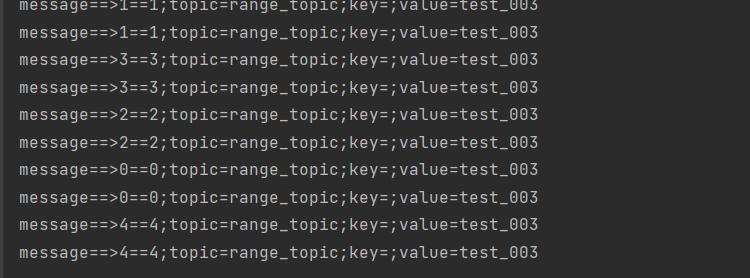
  1. 测试消息发送

可以看到消费者已经监听到消息。

  1. 发送事务消息

在上面的yaml 配置中的 producer 最后的一个配置是 transactionIdPrefix 目前是注释的,当放开此注释后transactionIdPrefix 默认发送消息就是以事务的方式发送消息。

首先放开此配置

1
transactionIdPrefix: tx-kafka-

但是开启事务后再调用send 发送消息后会报一个错误。

1
2
3
4
5
java.lang.IllegalStateException: No transaction is in process; possible solutions: run the template operation within the scope of a template.executeInTransaction() operation, start a transaction with @Transactional before invoking the template method, run in a transaction started by a listener container when consuming a record
at org.springframework.util.Assert.state(Assert.java:76) ~[spring-core-5.3.22.jar:5.3.22]
at org.springframework.kafka.core.KafkaTemplate.getTheProducer(KafkaTemplate.java:734) ~[spring-kafka-2.8.8.jar:2.8.8]
at org.springframework.kafka.core.KafkaTemplate.doSend(KafkaTemplate.java:644) ~[spring-kafka-2.8.8.jar:2.8.8]
at org.springframework.kafka.core.KafkaTemplate.send(KafkaTemplate.java:415) ~[spring-kafka-2.8.8.jar:2.8.8]

意思是发送事务消息不能使用此种消息发送。

编写事务消费发送。

1
2
3
4
5
6
7
8
9
10
11
12
13
14
@RequestMapping("/sendTransaction")
@Transactional
public String sendTransaction(String msg){
kafkaTemplate.executeInTransaction(new KafkaOperations.OperationsCallback<String, String, Object>() {
@Override
public Boolean doInOperations(KafkaOperations<String, String> operations) {
for (int i = 0; i < 10; i++) {
operations.send("range_topic",i % 5,"","tx_"+msg);
}
return true;
}
});
return "true";
}