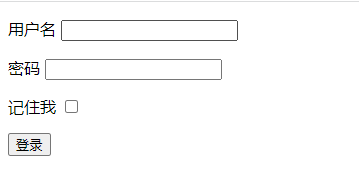
前面只是简单使用了springsecurity的登录控制功能,当然实际使用中是一定需要写一些自定义配置的;本节将通过springsecurity配置一些功能:

  • 通过数据库用户密码完成认证
  • 使用自定义登录页面
  • 实现记住我功能
  • 增加验证码功能

添加配置类

配置的一个比较重要的类是 WebSecurityConfigurerAdapter

新建一个配置类去继承WebSecurityConfigurerAdapter,同时开启 @EnableWebSecurity

1
2
3
4
5
6
@EnableWebSecurity
public class WebSecurityConfig extends WebSecurityConfigurerAdapter {


}

主要做配置的就是实现这3个configure 方法;

​ 1. 默认的AuthenticationManager 默认是获取的,而如果重写后那么将使用AuthenticationManagerBuilder 构建的AuthenticationManager ,此方法也可以用来配置认证用户信息;

1
2
3
protected void configure(AuthenticationManagerBuilder auth) throws Exception {
this.disableLocalConfigureAuthenticationBldr = true;
}
  1. 重写此方法配给制web安全相关的配置
1
2
3
  @Override
public void configure(WebSecurity web) throws Exception {
}
  1. 重写此方法配置授权和认证相关的接口的信息
1
2
3
4
@Override
protected void configure(HttpSecurity http) throws Exception {
super.configure(http);
}

自定义登录时认证信息获取

springsecurity 提供了获取用户信息的一个重要接口 UserDetailsService

在登录的时候会调用此接口的

1
2
3
4
//返回的信息是 UserDetails类

UserDetails 是用户的抽象信息,包含了用户名,密码,是否过期,是否启用等信息;
UserDetails loadUserByUsername(String username);

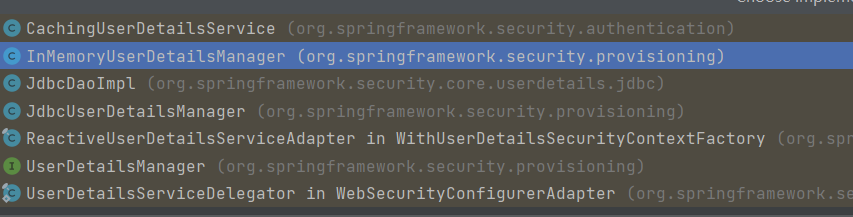
UserDetailsService 接口 框架默认也提供了多种实现

其中:
CachingUserDetailsService 通过装饰器模式装饰有缓存功能的service,内部维护了缓存
InMemoryUserDetailsManager 通过内存中获取用户信息的管理器
JdbcUserDetailsManager jdbc 通过jdbcTemplate 获取用户信息

基于内存的实现

使用@Bean声明一个 UserDetailsService 写在配置类中

1
2
3
4
5
6
7
@Bean
public UserDetailsService userDetailsService() {
InMemoryUserDetailsManager manager = new InMemoryUserDetailsManager();
manager.createUser(User.withDefaultPasswordEncoder().username("user").password("123456").roles("USER").build());
manager.createUser(User.withDefaultPasswordEncoder().username("admin").password("111111").roles("SYSTEM").build());
return manager;
}

简单看下 InMemoryUserDetailsManager 的实现,其实就是在map 中维护了用户的信息;

在登录的时候从map中获取信息比对;根据上面的配置就可以同时使用2个不同角色的用户执行登录;

查询数据库

  1. 引入mybatis-plugs 和mysql驱动等相关jar包

    1
    2
    3
    4
    5
    6
    7
    8
    9
    10
    11
    12
    13
       
    <dependency>
    <groupId>com.baomidou</groupId>
    <artifactId>mybatis-plus-boot-starter</artifactId>
    <version>3.4.3</version>
    </dependency>

    <dependency>
    <groupId>mysql</groupId>
    <artifactId>mysql-connector-java</artifactId>
    <version>8.0.27</version>
    </dependency>

    添加数据库驱动配置

    1
    2
    3
    4
    5
    6
    7
    8
    9

    # DataSource Config
    spring:
    datasource:
    driver-class-name: com.mysql.cj.jdbc.Driver
    url: jdbc:mysql://localhost:3306/db?useUnicode=true&characterEncoding=utf8&serverTimezone=GMT
    username: root
    password: 111111

  2. 实现自定义userdetailservice 及定义一个实现了UserDetails 接口的userdetail信息

1
2
3
4
5
6
7
8
9
10
11
12
13
public class MyUserDetailService implements UserDetailsService {

@Resource
private UserMapper userMapper;

@Override
public UserDetails loadUserByUsername(String username) throws UsernameNotFoundException {
User findUser = userMapper.findOneByUserName(username);
return MyUserDetails.create(findUser);
}
}


1
2
3
4
5
6
7
8
9
10
11
12
13
14
15
16
17
18
19
20
21
22
23
24
25
26
27
28
29
30
31
32
33
34
35
36
37
38
39
40
41
42
43
44
@TableName(value = "t_user")
public class User {

private Long id;
private String userName;
private String passWord;
private Boolean locked;

public Long getId() {
return id;
}

public void setId(Long id) {
this.id = id;
}

public String getUserName() {
return userName;
}

public void setUserName(String userName) {
this.userName = userName;
}

public String getPassWord() {
return passWord;
}

public void setPassWord(String passWord) {
this.passWord = passWord;
}

public Boolean getLocked() {
return locked;
}

public void setLocked(Boolean locked) {
this.locked = locked;
}


}


1
2
3
4
5
6
7
8
9
10
11
12
13
14
15
16
17
18
19
20
21
22
23
24
25
26
27
28
29
30
31
32
33
34
35
36
37
38
39
40
41
42
43
44
45
46
47
48
49
50
51
52


public class MyUserDetails extends User implements UserDetails {

public static MyUserDetails create(User user){
MyUserDetails userDetails = new MyUserDetails();
userDetails.setUserName(user.getUserName());
userDetails.setPassWord(user.getPassWord());

userDetails.setLocked(user.getLocked());
userDetails.setId(user.getId());

return userDetails;
}


@Override
public Collection<? extends GrantedAuthority> getAuthorities() {
return null;
}

@Override
public String getPassword() {
return getPassWord();
}

@Override
public String getUsername() {
return getUserName();
}

@Override
public boolean isAccountNonExpired() {
return true;
}

@Override
public boolean isAccountNonLocked() {
return !getLocked();
}

@Override
public boolean isCredentialsNonExpired() {
return true;
}

@Override
public boolean isEnabled() {
return true;
}
}

1
2
3
4
5
6
// UserDetailsService 的实现替换成自定义的类
@Bean
public UserDetailsService userDetailsService() {

return new MyUserDetailService();
}

PasswordEncoder

PasswordEncoder 是密码加密和解析的顶层接口;

encode 生成随机盐生成加密字符串
matches 密码是否匹配

并且提供了多种密码加解密实现,当然也可以自定义

登录操作的密码是密文保存的,所以需要定义加密实现类;

1
2
3
4
5
6
7
//将此类声明到配置类中
@Bean
public PasswordEncoder passwordEncoder(){
return new BCryptPasswordEncoder();
}


通过工具类手动插入到数据库用户名和密码

1
2
3
4
5
//生成密码插入数据库
BCryptPasswordEncoder encoder = new BCryptPasswordEncoder();
String password = encoder.encode("111111");
System.out.println(password);

测试登录,输入数据库中的用户名和密码可正常登录;

自定义登录页面

  1. 引入页面模板依赖

    1
    2
    3
    4
    <dependency>
    <groupId>org.springframework.boot</groupId>
    <artifactId>spring-boot-starter-thymeleaf</artifactId>
    </dependency>
  2. 添加配置文件

    1
    2
    3
    4
    5
    6
    7
    8
    9
    string:
    thymeleaf:
    servlet:
    content-type: text/html
    cache: false
    prefix: classpath:/templates/
    suffix: .html
    mode: HTML
    encoding: UTF-8
  3. 新增一个跳转到登录页面的方法和登录页面

    1
    2
    3
    4
    5
    @RequestMapping("/login")
    public String login(HttpServletRequest httpServletRequest){

    return "login";
    }
    1
    2
    3
    4
    5
    6
    7
    8
    9
    10
    11
    12
    13
    14
    15
    16
    17
    18
    19
    20
    21
    22
    23
    24
    25
    26
    27
    28
    29
    30
    31
    <!DOCTYPE html>
    <html xmlns:th="http://www.thymeleaf.org">
    <html lang="en">
    <head>
    <meta charset="UTF-8">
    <title>登录</title>
    </head>
    <body>
    <form action="/doLogin" method="post">
    <p th:if="${param.error != null}">
    用户名和密码错误
    </p>
    <p th:if="${param.logout != null}">
    退出登录
    </p>
    <p>
    <label for="username">用户名</label>
    <input type="text" id="username" name="username"/>
    </p>
    <p>
    <label for="password">密码</label>
    <input type="password" id="password" name="password"/>
    </p>
    <p>
    <label for="password">记住我</label>
    <input type="checkbox" id="rememberMe" name="rememberMe"/>
    </p>
    <button type="submit" class="btn">登录</button>
    </form>
    </body>
    </html>
  4. 配置登录页面相关配置

    ​ 配置说明configure(HttpSecurity http) 配置认证授权的相关配置通过HttpSecurity 进行构建;

    http 通过不同的方法获得不同的配置构造对象 再配置对应的子配置项。于xml的配置是等价的,可以看做是xml的 代码构造方法,每个and() 方法表示前一个配置项的结束,可以调用下一个方法配置下一个配置项。

    http.authorizeRequests() 配置请求权限的配置

    http.formLogin 配置表单登录的配置

    http.logout 配置退出的配置

    http.csrf 配置csrf的配置

    其他就不一一列举了;

    再此配置中我们定义了

    • 表单登录的页面请求地址– loginPage
    • 登录的处理url – loginProcessingUrl 表单提交登录请求提交到这个地址同时登录的url放开权限
    • 用户名参数名 密码的参数名 成功后重定向的url
    • 退出登录的url等
    1
    2
    3
    4
    5
    6
    7
    8
    9
    10
    11
    12
    13
    @Override
    protected void configure(HttpSecurity http) throws Exception {
    http.authorizeRequests().anyRequest().authenticated()
    .and().
    formLogin()
    .loginPage("/login").loginProcessingUrl("/doLogin").permitAll( .usernameParameter("username").passwordParameter("password").successForwardUrl("/index").and().csrf().disable()
    .logout().logoutUrl("/logout").addLogoutHandler(new LogoutHandler() {
    @Override
    public void logout(HttpServletRequest request, HttpServletResponse response, Authentication authentication) {

    }
    });
    }
  5. 访问任何页面跳转到自定义登录页面,通过用户名和密码能完成登录

记住我功能

记住我是一个比较常见的一个功能,为的是能够一段时间不用总是输入用户名和密码而保持登录状态,springsecurity 也提供了很好的支持。

当开启了记住我功能后,并且登录页面的记住我 对应的一个参数 remember-me (默认参数) 是true的时候,会将 用户名 + 过期事件 + 密码 得到一个散列值写到cookie 上,在访问的时候即使是未登录的状态但是remember-me 的cookie 还未过期,就从cookie中获取到信息完成自动登录

生成cookie 的加密方式

1
2
base64(username + ":" + expirationTime + ":" +
md5Hex(username + ":" + expirationTime + ":" password + ":" + key))

需要注意的是这个key 是随机生成的,那么当重启机器或请求打到别的机器可能自动登录就失效了,所以这个key应该是固定的。可以在配置的时候指定;

配置rememberme

添加rememberme 配置

1
2
.and()
.rememberMe().key("remember");

开启rememberMe 同时指定固定的加密的key

还可以添加其他自定义的操作

配置方法名说明
rememberMeCookieDomaincookie 域名
alwaysRemember总是触发
rememberMeCookieNamecookie的名称,默认是 remember-me
rememberMeParameter标题提交参数的名称提交true 或false ,默认名称是 remember-me
useSecureCookie是否只在https 的时候开启
userDetailsService当rememberme 失效的时候,指定userDetailsService 来查找用户信息,不配置的时候使用 HttpSecurity 默认的定义的userDetailsService

还是其他的设置这里就不一一说明了;

表单中添加rememberMe 参数;

1
2
3
4
<p>
<label for="password">记住我</label>
<input type="checkbox" id="rememberMe" name="remember-me"/>
</p>

已勾选记住我执行登录后可以看到浏览器上已经被写入remember-me 的cookie;

验证码功能

这里通过验证码举例来收买如何拓展其他登录校验逻辑;相信明白了验证码功能的校验的逻辑,登录的其他信息比如手机验证码也是同样的道理;

  1. 引入生成验证码的类库,为了方便引入hutool 工具包

    1
    2
    3
    4
    5
    <dependency>
    <groupId>cn.hutool</groupId>
    <artifactId>hutool-all</artifactId>
    <version>5.7.21</version>
    </dependency>
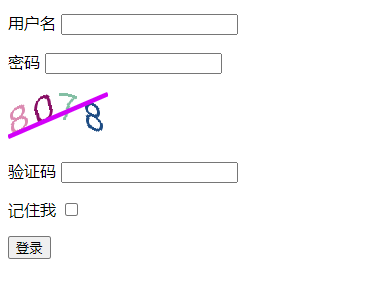
  2. 登录页面中放入一个简陋的验证码

    进入页面的时候将随机验证码生成数据传给页面,code值放入session中。真实环境可以考虑放入分布式缓存中。

    1
    2
    3
    4
    5
    6
    7
    8
    9
    10
    11
    12
    13
    14
    15
       
    @RequestMapping("/login")
    public String login(HttpServletRequest httpServletRequest, Model model){
    HttpSession session = httpServletRequest.getSession();
    //验证码
    ShearCaptcha captcha = CaptchaUtil.createShearCaptcha(100, 50, 4, 4);
    RandomGenerator randomGenerator = new RandomGenerator("0123456789", 4);
    captcha.setGenerator(randomGenerator);
    captcha.createCode();
    String code = captcha.getCode();
    model.addAttribute("captcha",captcha.getImageBase64Data());
    session.setAttribute("captchaCode",code);

    return "login";
    }
    1
    2
    3
    4
    5
    6
    7
    8
    9
    10
    11
    12
    13
    14
    15
    16
    17
    18
    19
    20
    21
    22
    23
    24
    25
    26
    27
    28
    29
    30
    31
    32
    33
    34
    35
    36
    //页面代码
    <!DOCTYPE html>
    <html xmlns:th="http://www.thymeleaf.org">
    <html lang="en">
    <head>
    <meta charset="UTF-8">
    <title>登录</title>
    </head>
    <body>
    <form action="/doLogin" method="post">
    <p th:if="${param.error != null}">
    登录错误
    </p>
    <p>
    <label for="username">用户名</label>
    <input type="text" id="username" name="username"/>
    </p>
    <p>
    <label for="password">密码</label>
    <input type="password" id="password" name="password"/>
    </p>
    <p>
    <img th:src="${captcha}">
    </p>
    <p>
    <label for="password">验证码</label>
    <input type="text" id="captcha" name="captcha"/>
    </p>
    <p>
    <label for="password">记住我</label>
    <input type="checkbox" id="rememberMe" name="remember-me"/>
    </p>
    <button type="submit" class="btn">登录</button>
    </form>
    </body>
    </html>
现在要做的是在校验用户名和密码之外 增加一个校验验证码的逻辑;

在登录执行的时候会将用户名和密码信息包装成一个 UsernamePasswordAuthenticationToken

最终通过 DaoAuthenticationProvider#additionalAuthenticationChecks 方法来校验密码是否正确;

我们现在通过拓展AuthenticationProvider 的additionalAuthenticationChecks 方式实现校验验证码。

不过需要拓展 UsernamePasswordAuthenticationToken 携带更多的信息,因为默认只携带了用户名和密码。

UsernamePasswordAuthenticationToken 有个details 属性。我们通过拓展这个details。

默认的 这details 是 WebAuthenticationDetails

新建一个类 继承 WebAuthenticationDetails

直接将HttpServletRequest 携带上,当然也可以自定义其他的属性,这里为了简单方便

1
2
3
4
5
6
7
8
9
10
11
12
13
14
15
16
17
public class MyAuthenticationDetails extends WebAuthenticationDetails {

private HttpServletRequest request;

public MyAuthenticationDetails(HttpServletRequest request) {
super(request);
this.request = request;
}

public HttpServletRequest getRequest() {
return request;
}

public void setRequest(HttpServletRequest request) {
this.request = request;
}
}

//定义一个自定的detailsSouce 登录的时候会调用

1
2
3
4
5
6
7
8
9
10
11
@Component
public class MyAuthenticationDetailsSource implements AuthenticationDetailsSource<HttpServletRequest,WebAuthenticationDetails> {


@Override
public WebAuthenticationDetails buildDetails(HttpServletRequest context) {

return new MyAuthenticationDetails(context);
}
}

实现自定义的 AuthenticationProvider

1
2
3
4
5
6
7
8
9
10
11
12
13
14
15
16
17
18
19
20
21
22
23
24
25
26
27
28
29
30
31
32
33
34
35
36
37
38
39
40
41

public class MyAuthenticationProvider extends DaoAuthenticationProvider {


public MyAuthenticationProvider(UserDetailsService userDetailsService, PasswordEncoder passwordEncoder) {
this.setUserDetailsService(userDetailsService);
this.setPasswordEncoder(passwordEncoder);
}


@Override
protected void additionalAuthenticationChecks(UserDetails userDetails, UsernamePasswordAuthenticationToken authentication) throws AuthenticationException {
//从details获取的是自己的类了
MyAuthenticationDetails myAuthenticationDetails = (MyAuthenticationDetails)authentication.getDetails();
HttpServletRequest request = myAuthenticationDetails.getRequest();
String captcha = request.getParameter("captcha");
if(StringUtils.isBlank(captcha)){
throw new CaptchaException("验证码不能为空");
}
String localCaptchaCode = request.getSession().getAttribute("captchaCode").toString();
if(!Objects.equals(captcha,localCaptchaCode)){
throw new CaptchaException("验证码错误");
}
//原来的方法
super.additionalAuthenticationChecks(userDetails, authentication);
}
}


//自定义异常类
public class CaptchaException extends AuthenticationException {

public CaptchaException(String msg, Throwable cause) {
super(msg, cause);
}

public CaptchaException(String msg) {
super(msg);
}
}

添加配置信息

完整配置如下

  • MyAuthenticationDetailsSource 需要设置到http.forlogin.authenticationDetailsSource

  • AuthenticationProvider 需要先声明 然后设置到 AuthenticationManagerBuilder 中

1
2
3
4
5
6
7
8
9
10
11
12
13
14
15
16
17
18
19
20
21
22
23
24
25
26
27
28
29
30
31
32
33
34
35
36
37
38
39
40
41
42
43
44
45
46
47
48
49
50
51
52
53
54
55
56
57
58
59
60
61
62
63
64
65
66
@EnableWebSecurity
public class WebSecurityConfig extends WebSecurityConfigurerAdapter {


@Bean
public UserDetailsService userDetailsService() {

return new MyUserDetailService();
}

@Bean
public PasswordEncoder passwordEncoder(){
return new BCryptPasswordEncoder();
}


@Autowired
private MyAuthenticationDetailsSource myAuthenticationDetailsSource;


@Autowired
private AuthenticationProvider authenticationProvider;


@Bean
public AuthenticationProvider authenticationProvider(UserDetailsService userDetailsService, PasswordEncoder passwordEncoder){

return new MyAuthenticationProvider(userDetailsService,passwordEncoder);
}


@Override
protected void configure(AuthenticationManagerBuilder auth) throws Exception {
auth.authenticationProvider(authenticationProvider);
}

@Override
public void configure(WebSecurity web) throws Exception {
super.configure(web);
}


@Override
protected void configure(HttpSecurity http) throws Exception {
http.authorizeRequests()
.anyRequest().authenticated()
.and().
formLogin()
.loginPage("/login").loginProcessingUrl("/doLogin").permitAll()
.usernameParameter("username").passwordParameter("password").successForwardUrl("/index")
.authenticationDetailsSource(myAuthenticationDetailsSource)

.and().csrf().disable()
.logout().logoutUrl("/logout").addLogoutHandler(new LogoutHandler() {
@Override
public void logout(HttpServletRequest request, HttpServletResponse response, Authentication authentication) {
System.out.println("===>>>");
}
}).and()
.rememberMe().key("remember");
}
}

至此就完成了自定义验证码校验的功能;

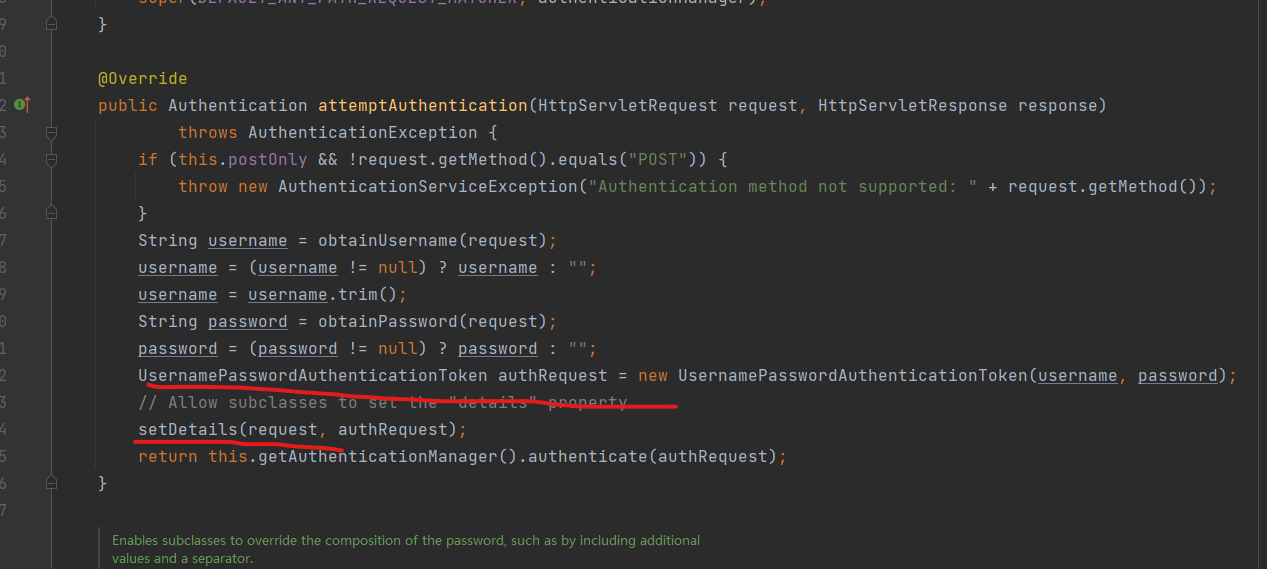
UsernamePasswordAuthenticationFilter 的处理登录方法中,包装usernametoken后,设置details

会调用 authenticationDetailsSource 去构建details,这里做了拓展;

而验证的时候会通过 ProviderManager 管理的AuthenticationProvider 这里是 DaoAuthenticationProvider 做了拓展;

详细可查看下一节登录源码分析流程;
json返回登录结果

如果通过ajax 请求登录和需要返回json格式的返回结果

可以借助springsecurity 提供针对表单登录的 successHandler 和 successHandler 做拓展;

假设希望登录成功后期望返回 {code :”200”,”msg”,”登录成功”}

//部分配置代码

1
2
3
4
5
6
7
8
9
10
11
12
13
14
15
16
17
18
19
20
21
22
23
24
.successHandler(new AuthenticationSuccessHandler(){
@Override
public void onAuthenticationSuccess(HttpServletRequest request, HttpServletResponse response, Authentication authentication) throws IOException, ServletException {
//登录成功了返回json信息
JSONObject ret = new JSONObject();
ret.putOpt("code",200).putOpt("msg","登录成功");
writeJson(response,ret);
}
})
.failureHandler(new AuthenticationFailureHandler() {
@Override
public void onAuthenticationFailure(HttpServletRequest request, HttpServletResponse response, AuthenticationException exception) throws IOException, ServletException {
JSONObject ret = new JSONObject();
ret.putOpt("code",401);
if(exception instanceof BadCredentialsException){
ret.putOpt("msg","用户名或密码错误");
}else if(exception instanceof CaptchaException){
ret.putOpt("msg","验证码错误");
}else{
ret.putOpt("msg","登录错误");
}
writeJson(response,ret);
}
})
1
2
3
4
5
6
7
8
9
10
11
//写json到response
private void writeJson(HttpServletResponse response, JSONObject jsonObject){
try {
response.setCharacterEncoding("utf-8");
response.setContentType("application/json; charset=utf-8");
PrintWriter writer = response.getWriter();
writer.write(jsonObject.toString());
} catch (IOException e) {
e.printStackTrace();
}
}

如果通过ajax请求错误将返回结果

1
2
3
4
{
"msg": "用户名或密码错误",
"code": 401
}